Free · no sign-up · nothing to install
Online schematic editor
Draw a clean circuit diagram in minutes: place symbols, connect pins with tidy right-angle wires, check the circuit and share it with a link.
Your schematic stays on your device until you share it.


Why it feels simple
Start right away
Open the page and draw. No account, no download, no project setup.
Tidy by default
Wires snap to the grid at right angles and junction dots appear where they belong.
One link to share
Send the whole schematic as a link to a friend, a forum or your social feed.
Everything the first version does well
Symbol library
Resistors, capacitors, inductors, diodes, LEDs, transistors, op-amps, regulators, the NE555 timer, switches and power and ground ports. Search by name or designator.
Right-angle wiring
Draw from pin to pin. Routing keeps 90° segments on the 20 px grid, adds junction dots at T-joints and lets you name nets with labels.
Electrical rules check
One click checks the circuit before you share or export it:
- floating pins and single-pin nets
- power shorted to ground
- duplicate designators and missing values
Export for anything
Drawing, netlist, bill of materials and the project file — ready for documentation, a post or another tool.
- SVG
- Netlist JSON
- BOM CSV
- BOM JSON
- Project JSON
Share with a link
The schematic travels inside the link, so whoever opens it gets their own editable copy. Nothing is uploaded.
Your work stays yours
Autosaved in your browser and saved as a JSON file you keep. No account and no cloud storage.
From blank sheet to a shared link
A full circuit in a few clicks: this is the real editor, recorded as it is.
Place parts
Pick a symbol in the library or press its key, then click on the sheet.
Connect pins
Start a wire on a pin and finish it on another pin or wire; double-click a value to edit it.
Check
Run ERC in the inspector and fix whatever it reports.
Share or export
Copy a link, post it to a network, or download SVG, netlist or BOM.
Handy keys
- R
- rotate
- CtrlD
- duplicate
- Delete
- delete
- CtrlS
- save
- CLDBG
- place a capacitor, inductor, diode, battery or ground
Show your circuit to anyone
Finished a schematic? Share it the way you like.
A link to the schematic
Copy one link and send it to a friend or a classmate: it opens your circuit in their editor.
Social networks
Post it in one click to Telegram, X, Facebook, Reddit, LinkedIn, WhatsApp or by email.
A picture for your post
Export the drawing as SVG to add it to an article, a forum answer or a slide.
Coming next
We are building these on top of sharing:
- Publish to the CircuitBase catalogueSubmit your schematic so others can find it next to the verified reference circuits.
- Embed on your websitePaste a widget into a blog or documentation page to show an interactive copy of your circuit.
Who it is for
Students and teachers
Draw lab circuits and homework diagrams, then share them with the class.
Makers and hobbyists
Sketch the wiring of your next project before you reach for the breadboard.
Documentation and forums
Make a clean diagram for a README, an article or a forum answer.
Engineers on the go
Explain an idea to a colleague in a minute, without opening a full EDA suite.
Simple on purpose — and growing
This is the first public version of the CircuitBase editor. It focuses on doing the essentials well: drawing, checking and sharing a schematic. We keep improving it and adding useful features, guided by what people build with it.
Choose CircuitBase Web CAD when you need
- a clean schematic in a few minutes
- to share a circuit with a single link
- a diagram for documentation, a lesson or a post
- to work without an account or an installation
Choose a full EDA suite such as KiCad or EasyEDA when you need
- PCB layout and manufacturing files
- circuit simulation
- large manufacturer part libraries
- multi-sheet, team-scale projects
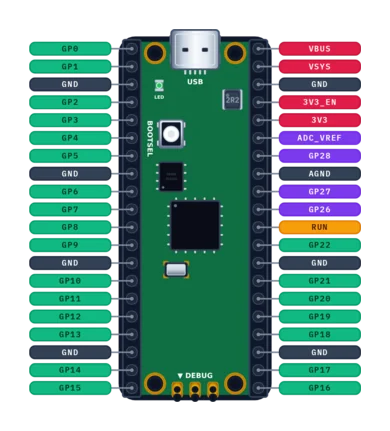
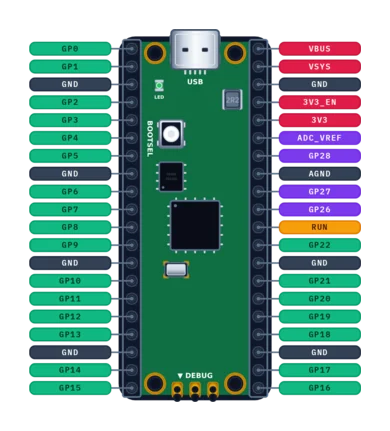
Reference data next to the editor
CircuitBase also publishes interactive, source-cited pinouts for development boards and standard connectors. Keep one open in another tab while you draw.
Questions and answers
Is the schematic editor free? Do I need an account?
Yes, it is free and there is no sign-up: the editor runs entirely in your browser.
How do I share a schematic?
Press Share in the editor and copy the link or pick a network. The schematic is stored inside the link itself; whoever opens it gets their own copy to edit.
Where are my schematics saved?
In your browser's local storage (autosave) and in the JSON project file you download. Browser storage can be cleared, so keep the file.
Which formats can I export?
SVG for the drawing, JSON for the netlist, JSON or CSV for the bill of materials (BOM), and the CircuitBase JSON project format. Native KiCad or Altium files are not produced.
Can I publish my schematic to the catalogue or embed it on my site?
Not yet — both are planned. Today you can share a link to the schematic or export it as SVG.
Can I simulate the circuit?
No. The editor checks connectivity with ERC but does not run SPICE simulation.
Which languages does the editor interface support?
English and Ukrainian. This page and the rest of CircuitBase are available in six languages.
Draw your first schematic now
It takes a few minutes, and the link to share it takes one click.